

Comparing Simfa vs Reface is like deciding between Apple and Samsung when buying the latest smartphone. Both have promising features and seem to be equal at first glance. However, one is definitely more worth it than the other. With face-swapping apps coming a long way from a source of quirky effects to powerful creative tools, choosing the one that offers solid value can be tricky.
To help users make an informed choice, this quick but comprehensive guide will compare Simfa vs Reface, highlighting the primary features and pricing options. It will look at both the web-based versions, particularly Simfa’s AI Face Swap and Reface’s Unboring Face Swap. At the end of the article, users are sure to find which one is the smarter pick for content creation.
Simfa vs Reface: Key Features
Face-Swapping Process
Unlike other options in the market, Simfa puts great emphasis on the swapping process by employing a calibration-first pipeline. In detail, it leverages its powerful artificial intelligence system to analyze the source file and develops a 3D representation of the face by synthesizing light conditions, geometry, and skin tone. This specific, detailed process enables Simfa to seamlessly integrate the face into an image or footage that maintains the correct movements, angle, lighting, and even expressions. And honestly, that makes a difference.
On the other hand, Reface has been in the face-swapping scene for a few years now and has developed its original face-swap technology. This particular innovation uses algorithms to identify facial features and generate face swaps that maintain realism and movements. It has a facial mapping feature that allows users to produce high-quality and hassle-free results. Reface also incorporates a library of templates that enables endless creativity.
User Experience
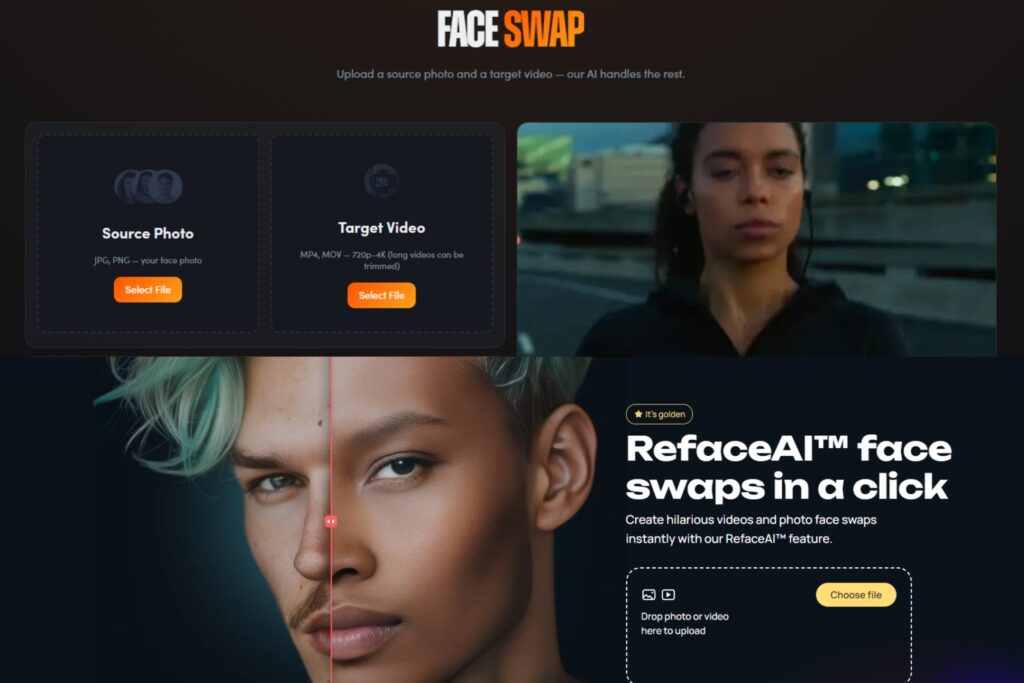
When it comes to ease of use, Simfa employs a quick two-step process, along with an easy-to-navigate interface. The simple layout clearly helps users perform face swaps by uploading the source photo and target image or video, then letting Simfa do what it does best. Waiting is also not an issue, as most results finish rendering in less than five seconds. After that, the output is instantly available for download without any additional installations required. Uploading files and posting of results on social media are also uncomplicated, as it supports JPG and PNG for still images and MP4, MOV, and WebM for videos.
Meanwhile, Reface has a slightly longer process, which includes three steps. Users need to upload the portrait, select a photo or video to face swap into, then wait for the process to complete and download the result. Moreover, Reface features an intuitive platform that caters to all levels of users. In terms of supported formats, this tool is limited to JPG, MP4, and MOV files.
Privacy and Security
Simfa ensures the secure storage of personal data and files. It even allows every user to demand immediate deletion of these or request a copy of the held information.
In contrast, Reface claims that it does not gather or store any files that users upload while using the app.
Simfa vs Reface: Pricing
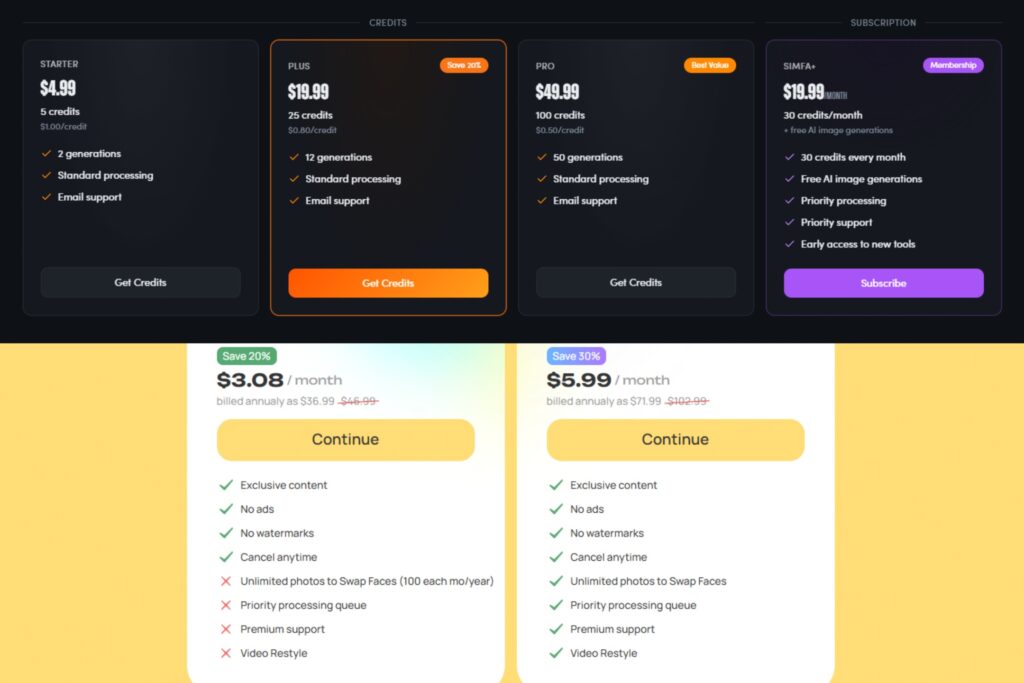
In terms of pricing, Simfa is on the more expensive side. However, it is only because the app aims to deliver specialized packages for every type of user. Its Starter Pack comes in at $4.99, which includes five credits, two generations, standard processing, and email support. Meanwhile, the $19.99-Plus Pack offers 25 credits and 12 generations, and the $49.99-Pro Pack provides 100 credits and 50 generations. Both the Plus and Pro Pack entail standard processing and email support. Simfa also offers a membership option for $19.99 a month, which brings 30 credits every month, free AI image generations, priority processing and support, and early access to new tools.
Reface, on the other hand, only has two subscription-style package options. The Basic Tier is priced at $3.08 a month, which promises exclusive content, no ads, and no watermarks. For its Premium Tier, users can pay $5.99 per month to get all the inclusions of the base package, along with unlimited face swaps, priority processing and support, and video restyle features.
Quick Comparison Table
| SIMFA | REFACE | WINNER | |
| Quality | Advanced calibration process, higly realistic |
Facial mapping, template-based, good realism | SIMFA |
| Speed | 2-step process | 3-step process | SIMFA |
| Ease of Use | Beginner-friendly | Beginner-friendly | TIE |
| File Support | JPG, PNG, MP4, MOV, WebM | JPG, MP4, MOV | SIMFA |
| Privacy | User-controlled | No file storage claimed | REFACE |
| Pricing | Flexible packages and plans | Simple subscriptions | SIMFA |
The Faceoff: Simfa vs Reface
While Reface is not so bad itself, Simfa is the clear winner of this comparison. It champions realism, advanced editing, and professional control. With cutting-edge features and flexible pricing packages, Simfa is the ultimate choice, delivering unmatched quality and creative potential.
Investing in Simfa means investing in quality and versatility. So, don’t just swap faces, empower your vision with Simfa!

