

In the high-stakes tactical world of Valorant, communication is everything. Whether you are shot-calling as Brimstone or celebrating a clutch ace with your team, your voice is your primary tool for coordination. However, adding a layer of entertainment or anonymity can make the experience even better.
Whether you want to troll your friends with a hilarious meme soundboard, maintain your privacy, or roleplay as your favorite Agent, a high-quality voice changer is the perfect companion. In this guide, we explore the top 5 voice changers and soundboards for Valorant, with a deep dive into why EaseUS VoiceWave stands out as the premier choice.
Why Use a Voice Changer in Valorant?
Valorant is more than just a shooter; it is a social hub. Players use voice changers for several reasons:
- Entertainment: Using a soundboard to play iconic “thwack” sounds or meme audio during the buy phase.
- Privacy: Masking your natural voice to protect your identity in public lobbies.
- Immersive Roleplay: Using high-quality filters to sound like a robot, a monster, or a specific character.
If you are also a fan of other gaming platforms, you might want to check out this guide on Roblox voice changers to keep the fun going across all your favorite titles.
Top 5 Voice Changers for Valorant
1. EaseUS VoiceWave (Recommended)
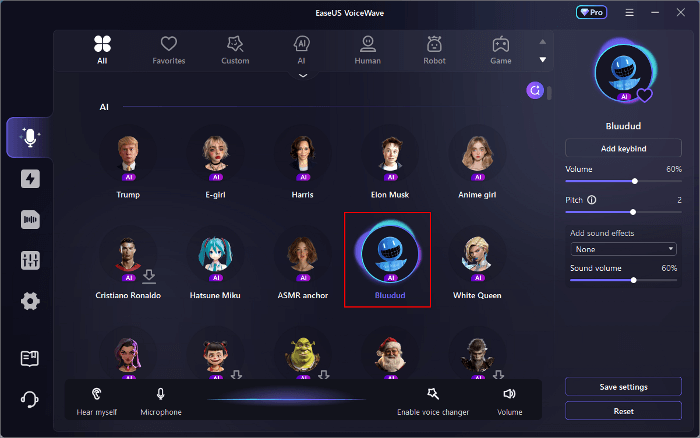
EaseUS VoiceWave is a professional-grade, AI-powered voice changer designed specifically for gamers and content creators. It offers a seamless experience with Valorant, providing real-time voice transformation without causing significant CPU lag—a crucial factor for a game that relies heavily on frame rates.
It features an intuitive interface and a massive library of voices ranging from “Male to Female” to “Deep Robot” and “Cartoon.” Its AI integration ensures that your transformed voice sounds natural and clear, avoiding the “tinny” distortion found in lesser software.
Key Features:
- Real-time AI Processing: Negligible latency during live matches.
- Massive Library: Over 100+ voice effects and 200+ online games supported.
- Built-in Soundboard: High-quality sound packs for instant memes and reactions.
- Customization: Advanced sliders to adjust pitch, tone, and timbre.
Pros:
- Extremely user-friendly interface for beginners.
- Crystal-clear output that doesn’t sound “robotic” unless you want it to.
- Compatible with Discord, Steam, and Valorant’s in-game VC.
Cons:
- Advanced AI features may require a stable internet connection for initial setup.
2. Voicemod
Voicemod is perhaps the most well-known name in the voice-changing world. It is a “freemium” software that offers a rotating selection of free voices every day. It is highly compatible with Valorant and offers a robust soundboard feature that allows you to map audio clips to your keyboard.
Key Features:
- Voicelab: A workspace to create your own unique voice filters.
- Meme Soundboard: Thousands of community-uploaded sounds.
- Tuna Integration: Connects to a massive database of sound clips.
Pros:
- Massive community support and tutorials.
- Great soundboard customization options.
Cons:
- The free version is quite limited, with many voices locked behind a “Pro” paywall.
- Can be heavy on system resources during intense gameplay.
3. Clownfish Voice Changer
If you are looking for something lightweight and “no-frills,” Clownfish is the classic choice. Unlike other apps that act as a virtual audio device, Clownfish operates at the system level, meaning it sits on your microphone driver and changes your voice across every app automatically.
Key Features:
- System-wide Integration: Works on everything from Valorant to Skype.
- Music Player: Built-in player to manage background audio.
- Simple Presets: Includes Alien, Atari, Clone, and Pitch Shift.
Pros:
- Incredibly lightweight; won’t affect your Valorant FPS.
- Completely free to use.
Cons:
- Very basic interface that looks outdated.
- Fewer voice options and lacks advanced AI-based filters.
4. MorphVOX Junior/Pro
MorphVOX is known for its high-quality voice-learning technology. It “learns” your voice to provide the best possible translation. The “Junior” version is free, while the “Pro” version offers more professional tools for streamers.
Key Features:
- Voice Learning: Calibrates to your specific vocal frequency.
- Background Cancellation: Filters out your mechanical keyboard clicks.
- Quick Effects: Hotkeys for quick voice changes mid-combat.
Pros:
- Excellent audio quality.
- Good at removing background noise, which is great for loud gaming environments.
Cons:
- The free (Junior) version is very limited.
- The setup process can be slightly more complex than EaseUS VoiceWave.
5. Soundpad
While primarily a soundboard rather than a voice changer, Soundpad is an essential mention for Valorant players. It allows you to play sounds through your microphone signal in high digital quality, making it the king of “mic-spamming” (in a fun way!).
Key Features:
- Audio Normalization: Ensures your sounds aren’t too loud or too quiet for your teammates.
- Recorder: Record what you hear and play it back instantly.
- Hotkeys: Bind sounds to your Numpad for instant access.
Pros:
- Extremely stable and lightweight.
- High audio fidelity.
Cons:
- Does not offer actual voice transformation (pitch shifting only).
- The free trial has a limit on how many sounds you can play per restart.
How to Set Up EaseUS VoiceWave for Valorant
Getting started is simple. Follow these steps to transform your Valorant experience:
- Download and Install: Visit the official EaseUS website and install VoiceWave.
- Configure Input: Open the software and select your main microphone as the input device and your headphones as the output.
- Choose a Voice: Select a voice filter (e.g., “Dread Knight” or “Female”) and turn on the “Voice Changer” toggle at the bottom.
- Launch Valorant: Open Valorant and go to Settings > Audio > Voice Chat.
- Change Input Device: Set the Input Device to “EaseUS VoiceWave Virtual Microphone.”
- Test: Use the “Loopback” test in Valorant to ensure your teammates hear the transformed voice.
Conclusion: Which One Should You Choose?
If you want the best balance of performance, variety, and ease of use, EaseUS VoiceWave is our top recommendation. While Clownfish is great for low-end PCs and Voicemod offers a great community, EaseUS VoiceWave provides the most modern AI filters that actually sound realistic in the heat of a tactical shooter.
Whether you want to hide your identity or just bring a smile to your teammates’ faces during a stressful ranked match, these tools will help you stand out. Just remember: always use voice changers responsibly and keep the community positive!

