

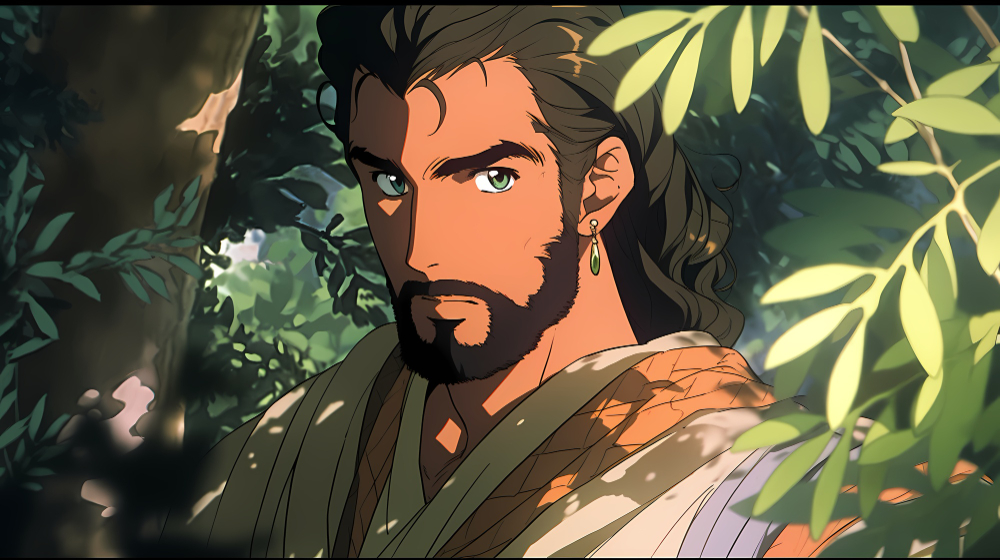
A regular selfie can become the starting point for a completely different visual identity. For anime fans, transforming personal photographs into illustrated portraits offers a creative way to combine everyday memories with the expressive world of Japanese animation. Familiar facial features can be reimagined through colorful backgrounds, distinctive hairstyles, expressive eyes, and carefully designed lighting. The result can feel like a personalized character rather than an ordinary photograph.
AI image-generation tools have made this creative process more accessible. People no longer need professional drawing experience to explore anime-inspired artwork. They can start with a photograph, describe the visual style they prefer, and experiment with different interpretations. Whether the goal is a social media avatar, a gaming profile, or a personal collection, understanding the process helps fans create portraits that feel more individual and visually appealing.
Why Fans Are Turning Personal Photos Into Anime Portraits
Anime has become an important part of global entertainment culture. Its influence extends beyond television and movies into gaming, fashion, digital illustration, online communities, and social media. Fans often connect with the distinctive appearance of animated characters, particularly their expressive faces, recognizable outfits, and imaginative environments.
Personalized anime portraits bring that interest into everyday digital life. Instead of using a standard photograph as a profile picture, someone can create an illustrated version that reflects their favorite artistic style. It provides a different way to express personality while maintaining a connection to their original appearance.
Social media has also encouraged people to experiment with creative profile pictures and visual identities. A distinctive anime portrait can make an account feel more personal and provide an interesting conversation starter among people who share similar interests.
Another reason for this trend is accessibility. Traditional digital illustration requires time, practice, and knowledge of drawing software. AI-assisted image creation offers another starting point, allowing beginners to explore visual ideas without mastering every technical skill first.
How AI Converts a Selfie Into an Anime-Style Portrait
AI image transformation uses visual information from a reference photograph to guide the creation of a new illustration. Rather than simply applying a basic color filter, an image-generation system can reinterpret facial details, lighting, textures, and surrounding elements according to a requested artistic direction.
For example, a photograph of someone smiling outdoors could become a colorful anime portrait with expressive eyes, softer facial shading, and an illustrated background. The original image provides a visual reference, while additional instructions help determine how the new artwork should look.
Fans interested in experimenting with this process can try this ai anime generator as one option. CapCut’s AI anime generator supports creative workflows involving text prompts and reference images, allowing users to explore different compositions, backgrounds, lighting, and artistic directions.
The transformation is not necessarily an exact reproduction of the original photograph. AI may change small facial details, clothing elements, or proportions as it interprets the requested style. Reviewing the result and making adjustments is therefore an important part of creating a satisfying portrait.
The most effective approach is to treat the first generated image as a creative draft. Fans can compare different versions, refine their instructions, and select the interpretation that best represents the character they want to create.
Choosing the Right Selfie for a Better Result
The original photograph plays an important role in determining the quality of an AI-generated anime portrait. Although image-generation technology can reinterpret many visual details, a clear reference makes it easier to establish the subject’s appearance.
A well-lit, front-facing selfie is often a practical starting point. The face should be clearly visible, with minimal shadows covering important features. Natural daylight can help reveal details around the eyes, nose, hair, and facial structure.
Backgrounds also deserve consideration. A simple wall, outdoor setting, or uncluttered room helps keep attention on the subject. Busy backgrounds may introduce unnecessary objects into the generated artwork or make the final composition less focused.
Expression is another useful factor. A natural smile may create a friendly and approachable anime character, while a serious expression could suit a dramatic or mysterious design. Fans should think about the mood they want before choosing their photograph.
Image quality matters as well. Blurry selfies, screenshots, and heavily compressed pictures can make facial details harder to interpret. Choosing an original, high-resolution photograph generally provides a stronger reference.
It is also helpful to consider the intended use. A close-up selfie may work well for a profile avatar, while a photograph showing the shoulders and surrounding environment offers more room for clothing and background details.
Exploring Different Anime Styles and Visual Directions
One of the most interesting parts of AI-assisted portrait creation is the ability to experiment with different artistic styles. The same reference photograph can produce noticeably different results depending on the instructions and visual direction.
Classic anime-inspired artwork is a familiar starting point. It often features expressive eyes, clean outlines, vibrant colors, and simplified shading. This approach works well for fans who want a recognizable animated appearance without adding too many decorative elements.
Manga-inspired portraits offer a different visual experience. Black-and-white tones, detailed linework, and stronger contrast can create an illustration that resembles a comic-book character. This style may be particularly appealing to fans who enjoy traditional manga artwork.
Fantasy-inspired designs allow more imaginative experimentation. A simple selfie can become the reference for a fictional character with dramatic lighting, elaborate clothing, magical surroundings, or a cinematic atmosphere. The original person’s appearance can provide the foundation while the surrounding details establish a new visual identity.
Pastel anime illustrations take a softer approach. Gentle colors, subtle highlights, and lighter backgrounds can create a calm and friendly appearance. These portraits often work well for personal avatars and social media graphics.
Fans can also explore futuristic, retro, watercolor, and game-inspired visual directions. Rather than choosing a style because it is popular, they should consider which one best communicates the character’s personality.
Writing Better AI Prompts for Personalized Portraits
A clear prompt can make the creative process more predictable. It gives the image-generation system additional information about the appearance, atmosphere, and artistic treatment the user wants.
A short instruction such as “turn my selfie into anime” provides a starting point, but it leaves many creative decisions open. A more detailed description can help establish a consistent visual direction.
For example, a fan might write:
“Create a detailed anime-style portrait based on the reference photograph. Keep the hairstyle and general facial appearance recognizable. Use expressive brown eyes, soft natural lighting, clean illustration outlines, warm colors, and a simple pastel background.”
This type of prompt describes both the subject and the intended artistic treatment. It also avoids introducing too many unrelated visual ideas.
A few elements are particularly useful when writing prompts:
- Artistic style: Specify classic anime, manga, fantasy illustration, or another preferred direction.
- Facial details: Describe the hairstyle, eye color, expression, and visible accessories.
- Lighting: Choose soft daylight, warm sunset lighting, or dramatic shadows.
- Background: Request a simple gradient, a city environment, a garden, or a fantasy setting.
- Overall mood: Explain whether the character should look cheerful, confident, thoughtful, adventurous, or mysterious.
It is better to make changes gradually instead of rewriting every instruction after each attempt. If the face looks right but the background is distracting, focus the next instruction on the background. This makes it easier to understand how individual changes affect the finished artwork.
Refining and Editing the Generated Anime Portrait
Generating an image is only one part of the creative process. Reviewing and refining the result helps turn an interesting experiment into artwork that is ready to share.
Start by examining the face. Check whether the hairstyle, expression, and general facial appearance are consistent with the reference photograph. Look for unexpected changes in the eyes, accessories, or clothing that might make the character feel different from the intended design.
Next, consider the composition. The subject should remain the main focus, and the background should support the illustration rather than compete with it. If the portrait looks crowded, a simpler environment may create a cleaner result.
Color adjustments can also improve the final appearance. Some anime illustrations use vibrant palettes, while others depend on muted tones and subtle shading. The right balance depends on the chosen style and the intended audience.
Cropping is particularly important for profile pictures. A square composition may work well for many social platforms, while vertical artwork can be more suitable for stories and mobile content. Keep important facial features away from the edges so they remain visible when an image is resized.
Fans can also consider adding simple decorative elements, such as a border or a background accent. However, excessive text, stickers, and effects can distract from the illustration itself. A balanced design usually creates a more polished result.
Creative Ways to Use Anime-Style Selfies
Once an anime portrait is ready, it can become part of several different digital projects. The most common use is a social media profile picture, where an illustrated version of the user provides an alternative to a conventional photograph.
Gaming communities offer another opportunity. Players often enjoy customizing their online identities through avatars and character artwork. An anime-inspired portrait can reflect their interests while making a profile feel more distinctive.
Fans can also create themed collections. For example, one person might develop several portraits based on different seasons, moods, or fictional settings. A summer-themed illustration could use bright colors and an outdoor background, while a winter version might feature cooler tones and a snowy environment.
Digital creators can use similar artwork in personal banners, video thumbnails, community posts, and fan-project graphics. When creating several related images, maintaining consistent details such as hairstyles, clothing, and color palettes can help establish a recognizable visual identity.
Before sharing an image, consider its intended platform and display size. A detailed illustration may look impressive at full resolution but lose some of its impact when displayed as a small circular avatar.
Privacy is important too. People should obtain permission before transforming or sharing another person’s photograph. If an image will be used commercially, they should also review the relevant tool’s usage terms and any applicable image rights.
Common Mistakes to Avoid When Creating AI Anime Art
Even with accessible tools, a few common mistakes can affect the final result. One of the biggest is choosing a poor-quality reference photograph. Blurry images, extreme lighting, and obstructed faces can make it harder to create a coherent illustration.
Vague prompts are another challenge. General instructions provide limited creative direction, which can lead to results that do not match the user’s expectations. Describing the artistic style, background, lighting, and mood gives the process a clearer direction.
Adding too many visual ideas can also create problems. A prompt that requests several unrelated environments, clothing styles, and artistic effects may produce an inconsistent composition. Keeping the main idea simple usually makes refinement easier.
Another mistake is expecting every generated version to preserve all facial details perfectly. AI image transformation involves interpretation, so some variation is normal. Reviewing several results and making focused adjustments can help users find a more suitable version.
Finally, fans should avoid treating every generated image as automatically ready for publication. Checking composition, image quality, privacy, and usage rights is an important final step.
The Future of Personalized Anime Portrait Creation
AI-assisted artwork is creating new opportunities for people who enjoy illustration but do not necessarily have professional drawing skills. Fans can explore different character concepts, experiment with visual storytelling, and develop personal artwork from photographs they already have.
As image-generation tools continue to evolve, users may gain more precise ways to guide character appearance, lighting, composition, and visual consistency. These improvements could make it easier to develop connected artwork rather than producing isolated portraits.
For anime communities, the appeal goes beyond technology. Personalized illustrations provide another way to participate in a shared creative culture, express individual interests, and experiment with visual identities.
The strongest results will still come from thoughtful creative decisions. A clear reference photograph, a focused prompt, a suitable artistic style, and careful editing all contribute to a better final image.
Ultimately, turning a selfie into an anime-style portrait is an opportunity to see an everyday photograph from a different perspective. AI provides a starting point, but personal imagination gives the finished artwork its character.

