


The recent World Economic Forum Future of Jobs report suggests that data analysts are among the in-demand careers for 2025-2030. Despite the positive trajectory, it’s undeniable that this job is also very challenging. Somewhere between the third pivot table and the fourth cup of coffee, most analysts have the same thought: there has to be a faster way to do this. That’s exactly why AI tools for data analysis have become indispensable.
Customer feedback. Financial records. Operational Metrics. Sales figures. Website traffic. Things pile up every day. Plus, with growing data complexity and the need for data-driven decision-making, it’s a must to turn thousands of rows into insights. All before opportunities disappear.
Exploring different AI tools built for different levels of data analysis, everyone can turn a two-day reporting cycle into a twenty-minute conversation. This guide highlights AI tools for data analysis that explain what the numbers mean and catch patterns a tired human eye would miss.
Top Five Best AI Tools for Data Analysis
ChatGPT
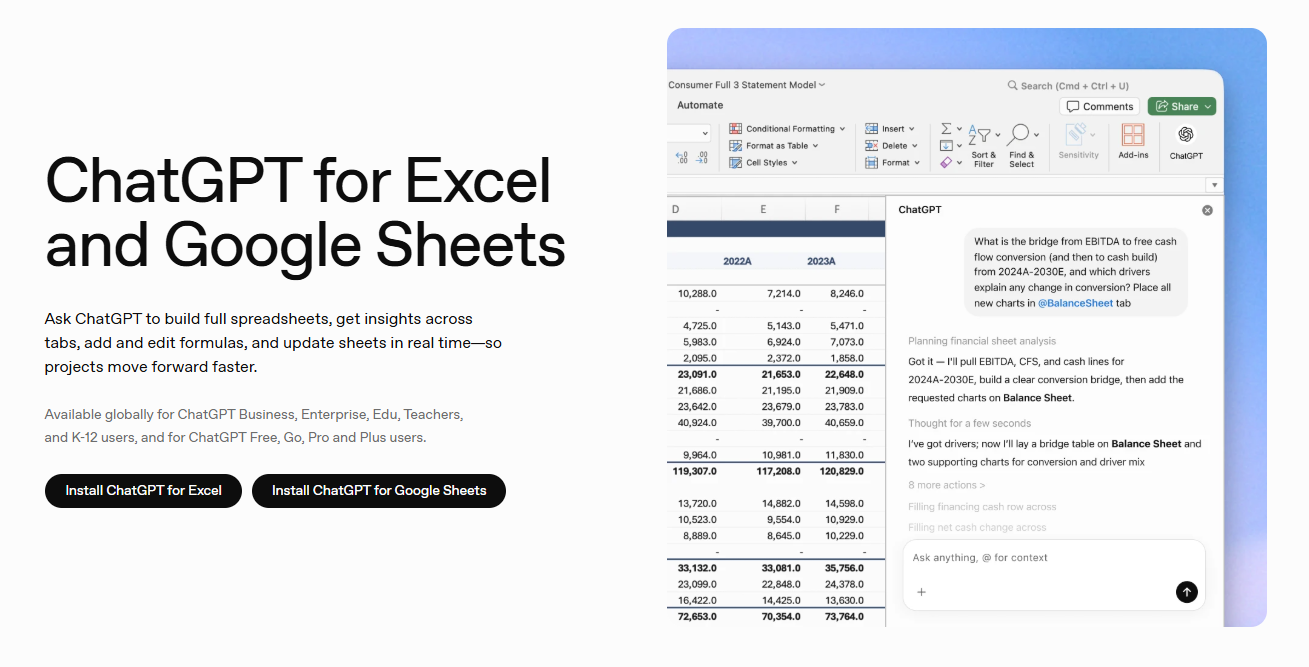
While not a full-blown data analysis platform, ChatGPT is a good starting point for beginners. It’s now capable of analyzing datasets, explaining statistical results, generating SQL queries, writing Python scripts, and summarizing complex reports. Advanced Data Analysis lets users upload a CSV or Excel file and ask questions. ChatGPT for spreadsheets works as a sidebar tool that sits directly in the open workspace, allowing users to edit cells, write formulas, and clean data in the grid in real time.
Key Features:
- Speeding up the entire analytical workflow
- Returns charts, tables, and plain-language takeaways
- Generating templates for various data analysis tasks
Pricing:
- Free Package
- Go Package – $8 per month
- Plus Package – $20 per month
- Pro Package – $100 per month
Real Use Case:
Marketing analysts can avoid manual spreadsheet filtering using ChatGPT. By uploading campaign performance data and asking which advertising channels delivered the highest ROI, the AI can summarize performance, identify trends, and recommend next-best actions.
Julius AI
Julius AI lets users perform data analysis through natural language. Not syntax. It has several features that make the work a lot easier. Users upload Excel files, CSVs, or spreadsheets and ask questions. Then, Julius runs regression analysis, detects correlations, identifies outliers, and explains statistical findings. This platform even includes a tool for generating charts, tables, summaries, and detailed reports on the fly. What’s more, users can set analysis tasks on autopilot for less manual work with Scheduled Runs.
Key Features:
- Transforming complex datasets into clear answers and actionable insights
- Seamless email and Slack integration
- Supports iteration through chat for more efficient report updates
Pricing:
- Free Package
- Plus Package – $20 per month
- Pro Package – $45 per month
- Max Package – $200 per month
- Business Package – $450 per month
- Ultra Package – $500 per month
Real Use Case:
Julius AI helps non-technical users, like student researchers, with data analysis without requiring them to write Python or R code. They can use it to determine demographic trends, make visualizations, and do statistical testing at speed.
Power BI
While not AI-native, Power BI includes an AI layer sitting on top through Copilot. This allows it to combine business intelligence with AI-powered insights. More powerful and efficient data analysis that provides dashboards and information for understanding performance and taking action. That means users can ask data-related questions, produce DAX formulas, and generate outliers and trends summaries. It draws directly from existing Excel and Azure data. For teams living in a Microsoft world, Power BI slots in with almost no friction.
Key Features:
- Solid Microsoft 365 ecosystem integration
- Predictive analytics and anomaly detection
- Running deep data analysis and generating report pages
Pricing:
- Free Package
- Power BI Pro Package – $14 per month/user (annual billing)
- Power BI Premium Per User Package – $24 per month/user (annual billing)
- Power BI Embedded Package – Custom Pricing
Real Use Case:
Retail chains can monitor daily sales, inventory levels, and regional performance with Power BI. It gives them automated dashboards. These let managers respond quickly when particular stores begin to underperform.
Tableau
Tableau built its reputation as one of the industry’s leading platforms for visual analytics. Serving different roles in the analytics workflow, it’s packed with products like Desktop, Server, Cloud, and Next. Its AI-powered capabilities help users derive insights and take action. More specifically, it allows users to explore data interactively, ask questions in natural language, and uncover meaningful trends through intuitive dashboards. Tableau makes multi-source data easier to understand. Even for non-technical stakeholders.
Key Features:
- Seamless syncing with Databricks, Microsoft, Salesforce, and Slack
- Finding patterns and trends with AI agents, dashboards, and metrics
- Creating data-driven decisions with confidence
Pricing:
- Free Package
- Standard Package – $15 per month/user (annual billing)
- Enterprise Package – $35 per month/user (annual billing)
- Cloud+ Package – Custom Pricing
Real Use Case:
Content management companies like Box benefit from the insights Tableau provides. With the goal of enhancing its content and workflow protection, the company optimized its security response to AI misuse threats.
Databricks
Teams handling large-scale data analysis can turn to Databricks. Built on the Lakehouse architecture, it stands out for streaming and analyzing data. Its tool suite, including Lakebase, Genie, Agent Bricks, and Lakehouse, enables technical teams to query, transform, and model massive datasets. Both structured and unstructured. Users can expect data engineering, analytics, and machine learning to be combined in a single platform.
Key Features:
- Unifying data, analytics, and AI
- Data-aware AI for extracting deeper insights
- Performing analytical and operational workloads
Pricing:
- Free Trial
- Pricing model depends on compute usage
Real Use Case:
Databricks allowed Prada Group to manage hundreds of stores across countries more efficiently. The data science team used it to unify data into a single, trusted source. They were able to make AI-powered forecasting models and personalize customer experiences.
Choosing the Must-Have AI Tools for Data Analysis in 2026
Today’s AI tools for data analysis help users uncover trends, visualize results, and make informed decisions much faster. ChatGPT, Julius AI, Power BI, Tableau, and Databricks allow you to spend less time cleaning spreadsheets, writing formulas, or manually searching for patterns.
However, no single tool here replaces the others or analysts. ChatGPT and Julius AI turn plain questions into real analysis. Tableau and Power BI transform data into visuals people can act on. Databricks handles the heavy lifting behind the scenes. So don’t limit yourself to just one. Match the right picks to the size and shape of the problem in front of you.

