


Reality is tougher than it sounds when making a quiz. Staring at a blank quiz template. Contemplating whether the questions test knowledge. Then comes balancing difficulty, checking answers, and formatting everything. But it’s something you shouldn’t skip. Research shows that actively recalling information through testing effectively improves long-term retention. So the problem now is to take much of that busywork off the table. Thanks to the retrieval methods AI tools use when creating quizzes, that specific kind of dread is almost nonexistent.
Students can create practice tests. Teachers can turn lessons into assessments. Trainers can build knowledge checks. All without having to build every question from scratch. In short, these AI tools shrink a two-hour task down to about ten minutes — assuming you pick the right tool for the job. But no need to guess, this guide lists the options worth knowing.
Top Five Best AI Tools for Creating Quizzes
Quizgecko
Quizgecko is built around AI-powered quiz generation. It turns handwritten notes, lecture slides, PDFs, and web links into a structured quiz. All without much fussing over settings. The AI handles parsing and phrasing itself. Users can pick from fill-in-the-blank, true-or-false, and multiple-choice formats. It’s even possible to set the difficulty level. What’s more, Quizgecko offers explanations for every answer. Plus, there are data-driven insights that help users see which topics they are weak in.
Key Features:
- Real-time grading and performance analytics
- Turning educational or professional content into a usable quiz quickly
- Timed practice tests for simulating actual exam conditions
Pricing:
- Free Package
- Plus Package – $16 per month
- Ultra Package – $29 per month
Real Use Case:
No need to write questions manually all afternoon. High school teachers can use Quizgecko to prepare a biology review. All that’s needed is to upload a genetics chapter and let AI generate a practice assessment. This way, teachers can focus on checking whether the AI correctly tests concepts.
Revisely
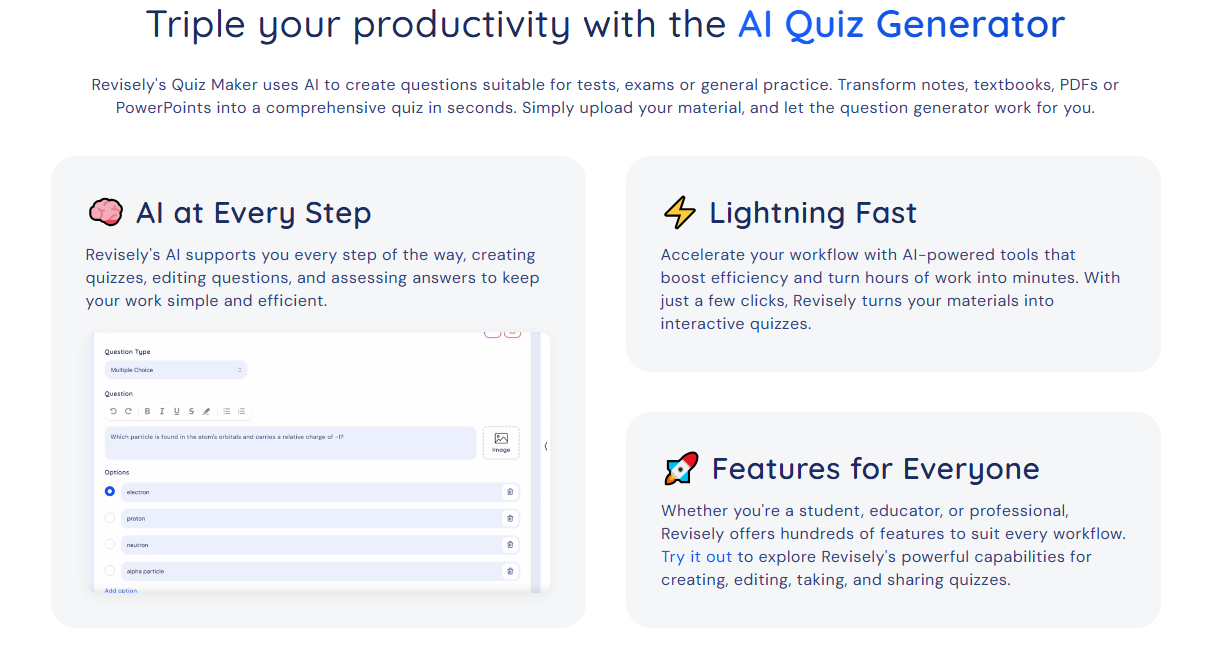
Revisely leans toward turning existing study material into learning resources. And that includes questions for general practice or quizzes. This tool comes in with a very familiar workflow. Users upload notes, PDFs, and PowerPoints. Revisely then generates questions based on the content. Three quiz types are supported. That includes multiple-choice, open-ended, and true-or-false questions. It even comes with an AI companion. Through this, users can enter prompts to give specific instructions or make customizations.
Key Features:
- Shareable quizzes for group study sessions
- Converting learning materials into structured practice tests
- Supports a diverse set of file formats
Pricing:
- Free Package
- Annual Package – $2.99 per month (billed annually)
- Monthly Package – $6.99 per month
Real Use Case:
Nursing students can use Revisely’s quiz generator to better review for an anatomy exam. By uploading lecture slides, they can produce a practice quiz. Students can take it, identify weak areas, and come back to the relevant material.
Quizlet
Quizlet is one of the most established names in digital studying. Its AI can generate quizzes from any uploaded material. Its standout feature is that it lets students format the questions according to their preferences. That ranges from matching and true/false to multiple-choice and written questions. Users can also set a timer to practice answering quizzes under pressure. On top of that, this tool gives useful feedback. This allows students to know what else and what still needs improvement.
Key Features:
- Multiple self-testing formats
- Large library of existing study sets
- AI-powered feedback and auto-grading
Pricing:
- Free Package
- Plus Package – $7.99 per month
- Plus Unlimited Package – $9.99 per month
Real Use Case:
Students dread history exams that cover specific dates, events, and people. But with Quizlet, they can turn class notes into a practice test. Quizzes that allow them to answer questions repeatedly. It makes it easier to spot which topics still need attention.
Questgen

Questgen is specifically built for making quizzes. And it’s intended for students, teachers, and HR teams. It’s also tailor-made for volume. It can produce 150 quizzes from images, PDFs, text, URLs, and videos in one pass. Generating different types of questions? Questgen can do it. It can deliver fill-in-the-blank, higher-order, match-the-following, multiple-choice, and true/false questions. Users can also edit and modify the output to meet their standards. These make it useful when one standard quiz format isn’t enough.
Key Features:
- Creating varied assessments from learning materials
- Supports multiple file formats for import and export
- Generating quizzes in bulk
Pricing:
- Free Package
- Pro Package – $15 per month
Real Use Case
Knowledge checks are easy to conduct with Questgen. Corporate trainers can use it to onboard new sales representatives. They can upload a product guide and generate a quiz. Questions that cover common customer scenarios, pricing rules, and product features.
Wayground (formerly Quizizz)
Wayground, after the rebranding, is not just a quiz-hosting platform. It now comes as a complete assessment ecosystem built for teachers. Of course, the tool still offers quiz generation. Users can produce questions from educational material or by entering prompts. Either way, the AI takes part in streamlining the process. Teachers can also customize the quizzes. Like adding explanations or translating questions into another language. Wayground even lets them run quizzes as live classroom activities or assignments.
Key Features:
- Turning routine assessments more fun with game-like elements
- Automatic grading and performance insights
- Supports multiple quiz formats
Pricing:
- Free Package
- School and District Package – Custom Pricing
Real Use Case:
Teachers reviewing algebra before an exam can create a Wayground assessment. In the same tool, students can answer from their own devices while the teacher monitors performance.
Choosing the Top AI Tools for Creating Quizzes in 2026
With AI tools for creating quizzes, users can start with almost any source and let AI handle the first draft. But none of the options mentioned are exactly interchangeable. They have similarities. But they excel in different areas. Quizgecko is a strong all-around generator. Revisely quickly turns existing learning material into practice. Quizlet is built around self-study. Questgen offers a wider variety of assessment formats. Wayground brings AI-generated quizzes into the classroom.
The best option depends on whether you’re a student getting ready for an exam, a teacher running a live classroom review, or a department building a reusable question bank. But whichever you choose, don’t treat the first AI-generated quiz as the finished product. Check the answers. Remove redundant questions. Ensure difficulty scaling is reasonable. The key principle? AI can build the quiz. You still decide whether it’s a good one.
To discover more about using retrieval methods for learning, visit our guide on AI tools for making flashcards.

